本系列教程共十篇
- valaxy博客全局美化教程(一):分类、标签、归档三个页面的美化教程
- valaxy博客全局美化教程(二):首页公告栏美化,新增随机文章展示板块
- valaxy博客全局美化教程(三):给网页增加加载动画
- valaxy博客全局美化教程(四):增加图片预览功能
- valaxy博客全局美化教程(五):友链页面美化,修改了友链样式以及增加留言板
- valaxy博客全局美化教程(六):留言页面增加信封展开效果
- valaxy博客全局美化教程(七):新增网址导航页面
- valaxy博客全局美化教程(八):页脚倒计时、搜索问题修复
- valaxy博客全局美化教程(九):新增相册页面,支持使用webdav作为相册
- valaxy博客全局美化教程(十):修复构建结束的时候会卡住
效果演示
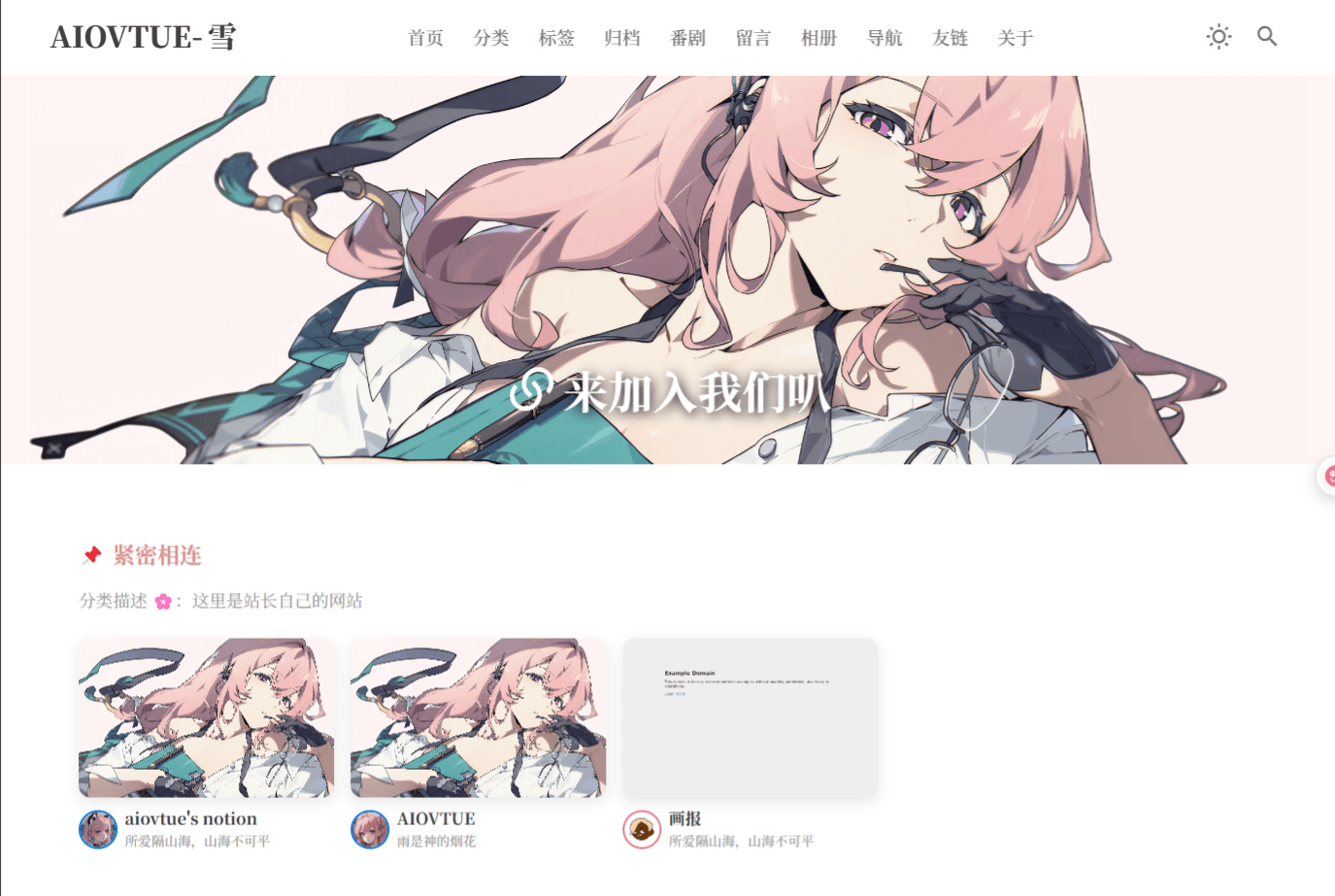
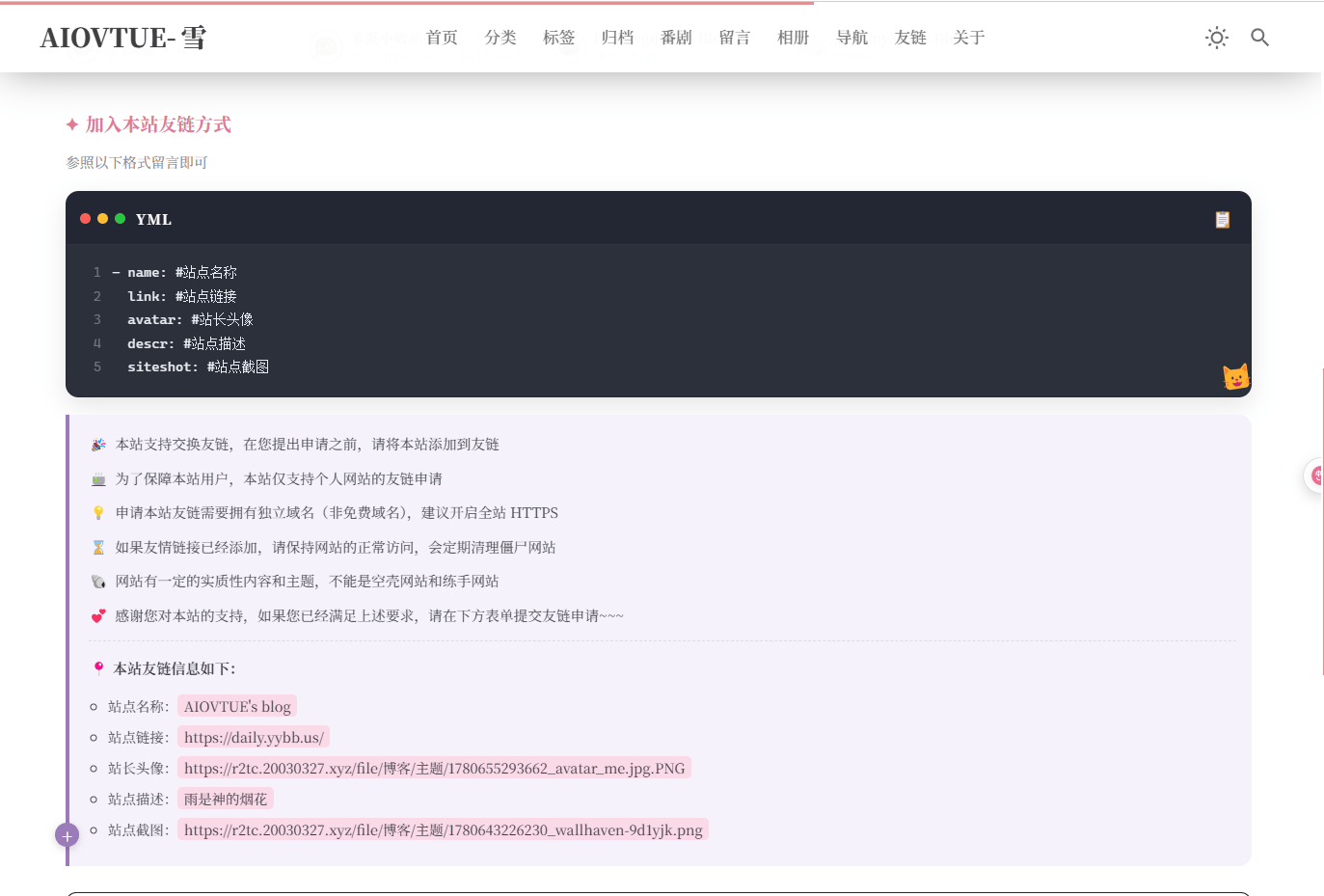
原本的友链页面比较单调,也没有留言板,就改了一下
新增文件
以下是新增文件部分哦,共4个文件
第一个比较特殊,说明一下,公告部分再次修改
const rules = [
  { icon: '🎉', text: '本站支持交换友链,在您提出申请之前,请将本站添加到友链' },
  { icon: '🍵', text: '为了保障本站用户,本站仅支持个人网站的友链申请' },
  { icon: '💡', text: '申请本站友链需要拥有独立域名(非免费域名),建议开启全站 HTTPS' },
  { icon: '⌛', text: '如果友情链接已经添加,请保持网站的正常访问,会定期清理僵尸网站' },
  { icon: '🐚', text: '网站有一定的实质性内容和主题,不能是空壳网站和练手网站' },
  { icon: '💕', text: '感谢您对本站的支持,如果您已经满足上述要求,请在下方表单提交友链申请~~~' },
]这里面的中文可以自由修改 下面这部分是自己站点的友链信息:
          本站友链信息如下:
        </p>
        <ul class="friend-link-site-info__list">
          <li>
            站点名称:<span class="friend-link-highlight">{{ siteInfo.name }}</span>
          </li>
          <li>
            站点链接:<span class="friend-link-highlight">{{ siteInfo.url }}</span>
          </li>
          <li>
            站长头像:<span class="friend-link-highlight">{{ siteInfo.avatar }}</span>
          </li>
          <li>
            站点描述:<span class="friend-link-highlight">{{ siteInfo.desc }}</span>
          </li>
          <li>
站点截图:<span class="friend-link-highlight">{{ siteInfo.siteshot }}</span>正常情况会自动获取配置文件的链接、名称、头像等东西自动获取,但是如果你发现获取的信息不对,或者你就是想不一样,可以修改,举个例子,我要修改站点截图,就将{{ siteInfo.siteshot }}整个替换为你想加的链接,完整示例如下:
</span>
          </li>
          <li>
站点截图:<span class="friend-link-highlight">https://你的图床.png</span>还有,开头的:
const props = withDefaults(defineProps<{
  siteshot?: string
}>(), {
  siteshot: 'https://你的图床.png',
})图片链接记得替换
好啦,开始新增第一个文件吧
新增 components\FriendLinkNotice.vue
<script setup lang="ts">
import { useSiteConfig } from 'valaxy'
import { computed } from 'vue'

const props = withDefaults(defineProps<{
  siteshot?: string
}>(), {
  siteshot: 'https://你的图床.png',
})

const siteConfig = useSiteConfig()

const ymlTemplate = `- name: #站点名称
  link: #站点链接
  avatar: #站长头像
  descr: #站点描述
  siteshot: #站点截图`

const ymlLines = computed(() => ymlTemplate.split('\n'))

const siteInfo = computed(() => {
  const url = siteConfig.value.url || ''
  return {
    name: `${siteConfig.value.title || 'AIOVTUE'}'s blog`,
    url: url.endsWith('/') ? url : `${url}/`,
    avatar: siteConfig.value.author?.avatar || '',
    desc: siteConfig.value.description || '',
    siteshot: props.siteshot,
  }
})

const rules = [
  { icon: '🎉', text: '本站支持交换友链,在您提出申请之前,请将本站添加到友链' },
  { icon: '🍵', text: '为了保障本站用户,本站仅支持个人网站的友链申请' },
  { icon: '💡', text: '申请本站友链需要拥有独立域名(非免费域名),建议开启全站 HTTPS' },
  { icon: '⌛', text: '如果友情链接已经添加,请保持网站的正常访问,会定期清理僵尸网站' },
  { icon: '🐚', text: '网站有一定的实质性内容和主题,不能是空壳网站和练手网站' },
  { icon: '💕', text: '感谢您对本站的支持,如果您已经满足上述要求,请在下方表单提交友链申请~~~' },
]

async function copyYml() {
  try {
    await navigator.clipboard.writeText(ymlTemplate)
  }
  catch (err) {
    console.error(err)
  }
}
</script>

<template>
  <section class="friend-link-notice">
    <header class="friend-link-notice__header">
      <h2 class="friend-link-notice__title">
        <span class="friend-link-notice__title-icon" aria-hidden="true">✦</span>
        加入本站友链方式
      </h2>
      <p class="friend-link-notice__subtitle">
        参照以下格式留言即可
      </p>
    </header>

    <div class="friend-link-code">
      <div class="friend-link-code__bar">
        <div class="friend-link-code__dots" aria-hidden="true">
          <span class="dot dot-red" />
          <span class="dot dot-yellow" />
          <span class="dot dot-green" />
        </div>
        <span class="friend-link-code__lang">YML</span>
        <button
          type="button"
          class="friend-link-code__copy"
          title="复制代码"
          @click="copyYml"
        >
          📋
        </button>
      </div>

      <pre class="friend-link-code__body"><code><span
        v-for="(line, index) in ymlLines"
        :key="index"
        class="friend-link-code__line"
      ><span class="friend-link-code__ln">{{ index + 1 }}</span><span class="friend-link-code__text">{{ line }}</span>
</span></code></pre>

      <span class="friend-link-code__cat" aria-hidden="true">🐱</span>
    </div>

    <div class="friend-link-rules">
      <span class="friend-link-rules__plus" aria-hidden="true">+</span>

      <ul class="friend-link-rules__list">
        <li
          v-for="(rule, index) in rules"
          :key="index"
          class="friend-link-rules__item"
        >
          <span class="friend-link-rules__icon">{{ rule.icon }}</span>
          <span>{{ rule.text }}</span>
        </li>
      </ul>

      <div class="friend-link-site-info">
        <p class="friend-link-site-info__title">
          <span aria-hidden="true">📍</span>
          本站友链信息如下:
        </p>
        <ul class="friend-link-site-info__list">
          <li>
            站点名称:<span class="friend-link-highlight">{{ siteInfo.name }}</span>
          </li>
          <li>
            站点链接:<span class="friend-link-highlight">{{ siteInfo.url }}</span>
          </li>
          <li>
            站长头像:<span class="friend-link-highlight">{{ siteInfo.avatar }}</span>
          </li>
          <li>
            站点描述:<span class="friend-link-highlight">{{ siteInfo.desc }}</span>
          </li>
          <li>
            站点截图:<span class="friend-link-highlight">{{ siteInfo.siteshot }}</span>
          </li>
        </ul>
      </div>
    </div>
  </section>
</template>

<style lang="scss" scoped>
.friend-link-notice {
  --notice-accent: #c9a0dc;
  --notice-accent-deep: #9b7bb8;
  --notice-pink: #e8a4b8;
  --notice-title: #e07a96;

  width: 100%;
  box-sizing: border-box;

  @at-root html.dark & {
    --notice-accent: #9b7bb8;
    --notice-accent-deep: #b89fd0;
    --notice-title: #f0a8bc;
  }
}

.friend-link-notice__header {
  margin-bottom: 14px;
}

.friend-link-notice__title {
  display: flex;
  align-items: center;
  gap: 6px;
  margin: 0 0 6px;
  font-size: 1.05rem;
  font-weight: 700;
  color: var(--notice-title);
}

.friend-link-notice__title-icon {
  font-size: 0.95rem;
  line-height: 1;
}

.friend-link-notice__subtitle {
  margin: 0;
  font-size: 0.82rem;
  color: #888;

  @at-root html.dark & {
    color: #b0b0b8;
  }
}

.friend-link-code {
  position: relative;
  overflow: hidden;
  margin-bottom: 16px;
  border-radius: 12px;
  border: 1px solid oklch(0% 0 0 / 12%);
  box-shadow: 0 8px 22px oklch(0% 0 0 / 10%);
  background: #2b303b;
}

.friend-link-code__bar {
  display: flex;
  align-items: center;
  gap: 10px;
  padding: 10px 12px;
  background: #232733;
  border-bottom: 1px solid oklch(100% 0 0 / 6%);
}

.friend-link-code__dots {
  display: flex;
  gap: 6px;
}

.dot {
  width: 10px;
  height: 10px;
  border-radius: 50%;
}

.dot-red {
  background: #ff5f57;
}

.dot-yellow {
  background: #febc2e;
}

.dot-green {
  background: #28c840;
}

.friend-link-code__lang {
  flex: 1;
  font-size: 0.82rem;
  font-weight: 700;
  color: #fff;
  letter-spacing: 0.06em;
}

.friend-link-code__copy {
  display: inline-flex;
  align-items: center;
  justify-content: center;
  width: 28px;
  height: 28px;
  border: none;
  border-radius: 6px;
  background: transparent;
  color: #c8d0dc;
  cursor: pointer;
  transition: background 0.2s ease, color 0.2s ease;

  &:hover {
    background: oklch(100% 0 0 / 8%);
    color: #fff;
  }
}

.friend-link-code__body {
  margin: 0;
  padding: 14px 12px 16px;
  overflow-x: auto;
  background: #2b303b;
}

.friend-link-code__body code {
  display: block;
  font-family: 'JetBrains Mono', 'Cascadia Code', Consolas, monospace;
  font-size: 0.78rem;
  line-height: 1.75;
  color: #e6edf3;
  white-space: pre;
}

.friend-link-code__line {
  display: block;
}

.friend-link-code__ln {
  display: inline-block;
  width: 1.6em;
  margin-right: 0.8em;
  color: #6e7681;
  user-select: none;
  text-align: right;
}

.friend-link-code__text {
  color: #e6edf3;
}

.friend-link-code__cat {
  position: absolute;
  right: -4px;
  bottom: 8px;
  font-size: 1.6rem;
  line-height: 1;
  pointer-events: none;
  transform: rotate(-8deg);
}

.friend-link-rules {
  position: relative;
  padding: 16px 14px 16px 18px;
  border-radius: 0 12px 12px 0;
  border-left: 4px solid var(--notice-accent-deep);
  background: oklch(96% 0.015 310 / 88%);

  @at-root html.dark & {
    background: oklch(24% 0.02 300);
    border-left-color: #b89fd0;
  }
}

.friend-link-rules__plus {
  position: absolute;
  left: -13px;
  bottom: 18px;
  display: inline-flex;
  align-items: center;
  justify-content: center;
  width: 22px;
  height: 22px;
  border-radius: 50%;
  background: var(--notice-accent-deep);
  color: #fff;
  font-size: 1rem;
  font-weight: 700;
  line-height: 1;
  box-shadow: 0 2px 8px oklch(0% 0 0 / 15%);
}

.friend-link-rules__list {
  margin: 0;
  padding: 0;
  list-style: none;
}

.friend-link-rules__item {
  display: flex;
  gap: 6px;
  margin-bottom: 10px;
  font-size: 0.82rem;
  line-height: 1.65;
  color: #4a4a52;

  @at-root html.dark & {
    color: #e4e4ea;
  }
}

.friend-link-rules__icon {
  flex-shrink: 0;
}

.friend-link-site-info {
  margin-top: 12px;
  padding-top: 12px;
  border-top: 1px dashed oklch(0% 0 0 / 10%);

  @at-root html.dark & {
    border-top-color: oklch(100% 0 0 / 14%);
  }
}

.friend-link-site-info__title {
  margin: 0 0 10px;
  font-size: 0.84rem;
  font-weight: 600;
  color: #3a3a42;

  @at-root html.dark & {
    color: #f0f0f4;
  }
}

.friend-link-site-info__list {
  margin: 0;
  padding-left: 1.1em;
  list-style: circle;
}

.friend-link-site-info__list li {
  margin-bottom: 8px;
  font-size: 0.8rem;
  line-height: 1.6;
  color: #4a4a52;
  word-break: break-all;

  @at-root html.dark & {
    color: #d8d8e0;
  }
}

.friend-link-highlight {
  display: inline;
  padding: 1px 6px;
  border-radius: 4px;
  background: oklch(92% 0.04 350);
  color: #3a3a42;

  @at-root html.dark & {
    background: oklch(38% 0.06 350);
    color: #ffe8f0;
  }
}

</style>第二个~ 下方文件内部有一行代码图床要替换哦,不换也行,上面自己站点信息站点截图链接自己写就行,不影响
const previewFallback = 'https://你的图床.png'好啦,开始新增~
新增components\SakuraLinks.vue
<script lang="ts" setup>
import { computed } from 'vue'

interface FriendLinkItem {
  url: string
  avatar: string
  name: string
  blog?: string
  desc?: string
  descr?: string
  color?: string
  siteshot?: string
}

interface FriendLinkGroup {
  name?: string
  desc?: string
  links: FriendLinkItem[]
}

const props = defineProps<{
  links?: string | FriendLinkItem[]
  linkGroups?: FriendLinkGroup[]
  random?: boolean
  errorImg?: string
}>()

const previewFallback = 'https://你的图床.png'

function normalizeLink(link: FriendLinkItem) {
  return {
    url: link.url,
    avatar: link.avatar,
    name: link.name,
    blog: link.blog || link.name,
    desc: link.desc || link.descr || '',
    color: link.color || '#0078e7',
    siteshot: getSiteshot(link),
  }
}

function getSiteshot(link: FriendLinkItem) {
  if (link.siteshot)
    return link.siteshot

  if (!link.url)
    return previewFallback

  return `https://s0.wp.com/mshots/v1/${encodeURIComponent(link.url)}?w=800&h=450`
}

function shuffleLinks<T>(list: T[]) {
  return [...list].sort(() => Math.random() - 0.5)
}

const groupList = computed(() => {
  if (Array.isArray(props.linkGroups) && props.linkGroups.length > 0) {
    return props.linkGroups.map((group) => {
      const links = props.random ? shuffleLinks(group.links) : [...group.links]
      return {
        name: group.name || '',
        desc: group.desc || '',
        links: links.map(normalizeLink),
      }
    })
  }

  if (typeof props.links === 'string' || !Array.isArray(props.links))
    return []

  const links = props.random ? shuffleLinks(props.links) : [...props.links]
  return [{
    name: '',
    desc: '',
    links: links.map(normalizeLink),
  }]
})

function onPreviewError(event: Event) {
  const img = event.target as HTMLImageElement
  if (img.dataset.fallbackApplied)
    return

  img.dataset.fallbackApplied = '1'
  img.src = props.errorImg || previewFallback
}
</script>

<template>
  <div class="links-preview">
    <section
      v-for="(group, groupIndex) in groupList"
      :key="groupIndex"
      class="links-preview-group"
    >
      <header
        v-if="group.name"
        class="links-preview-group__header"
      >
        <h2 class="links-preview-group__title">
          <span class="links-preview-group__pin" aria-hidden="true">📌</span>
          {{ group.name }}
        </h2>
        <p
          v-if="group.desc"
          class="links-preview-group__desc"
        >
          分类描述 🌸:{{ group.desc }}
        </p>
      </header>

      <ul class="links-preview-grid">
        <li
          v-for="(link, i) in group.links"
          :key="`${groupIndex}-${i}`"
          class="links-preview-item"
          :style="{ '--link-color': link.color }"
        >
          <a
            class="links-preview-card"
            :href="link.url"
            :title="link.name"
            rel="friend noopener"
            target="_blank"
          >
            <div class="links-preview-shot">
              <img
                :src="link.siteshot"
                :alt="`${link.name} 站点预览`"
                loading="lazy"
                decoding="async"
                @error="onPreviewError"
              >
            </div>

            <div class="links-preview-meta">
              <img
                class="links-preview-avatar"
                :src="link.avatar"
                :alt="link.name"
                loading="lazy"
                decoding="async"
              >

              <div class="links-preview-text">
                <div class="links-preview-name">
                  {{ link.blog }}
                </div>
                <div class="links-preview-desc">
                  {{ link.desc }}
                </div>
              </div>
            </div>
          </a>
        </li>
      </ul>
    </section>
  </div>
</template>

<style lang="scss" scoped>
.links-preview {
  --link-card-width: 210px;
  width: 100%;
  box-sizing: border-box;
}

.links-preview-group + .links-preview-group {
  margin-top: 40px;
}

.links-preview-group__header {
  margin-bottom: 20px;
}

.links-preview-group__title {
  display: flex;
  align-items: center;
  gap: 6px;
  margin: 0 0 8px;
  font-size: 1.15rem;
  font-weight: 700;
  color: var(--sakura-color-primary, #fe9500);
}

.links-preview-group__pin {
  font-size: 1rem;
  line-height: 1;
}

.links-preview-group__desc {
  margin: 0;
  font-size: 0.88rem;
  line-height: 1.6;
  color: var(--sakura-color-text-muted, #888);
}

.links-preview-grid {
  display: flex;
  flex-wrap: wrap;
  justify-content: flex-start;
  gap: 18px 14px;
  margin: 0;
  padding: 0;
  list-style: none;
}

.links-preview-item {
  width: var(--link-card-width, 210px);
  max-width: 100%;
  flex: 0 0 auto;
  min-width: 0;
}

.links-preview-card {
  display: block;
  color: inherit;
  text-decoration: none;
  transition: transform 0.25s ease;

  &:hover {
    transform: translateY(-3px);

    .links-preview-shot {
      box-shadow: 0 14px 28px oklch(0% 0 0 / 18%);
    }

    .links-preview-name {
      color: var(--link-color, var(--sakura-color-primary, #fe9500));
    }
  }
}

.links-preview-shot {
  overflow: hidden;
  aspect-ratio: 16 / 10;
  border-radius: 10px;
  background: var(--va-c-bg-mute, oklch(94% 0 0));
  box-shadow: 0 4px 12px oklch(0% 0 0 / 9%);
  transition: box-shadow 0.25s ease;

  img {
    display: block;
    width: 100%;
    height: 100%;
    object-fit: cover;
    object-position: top center;
  }
}

.links-preview-meta {
  display: flex;
  align-items: center;
  gap: 6px;
  margin-top: 8px;
  min-width: 0;
}

.links-preview-avatar {
  flex-shrink: 0;
  width: 32px;
  height: 32px;
  border-radius: 50%;
  object-fit: cover;
  border: 2px solid var(--link-color, var(--sakura-color-primary, #fe9500));
  background: var(--va-c-bg, #fff);
}

.links-preview-text {
  min-width: 0;
  flex: 1;
}

.links-preview-name {
  font-size: 0.84rem;
  font-weight: 700;
  line-height: 1.4;
  color: var(--sakura-color-text-deep, #333);
  white-space: nowrap;
  overflow: hidden;
  text-overflow: ellipsis;
  transition: color 0.2s ease;
}

.links-preview-desc {
  margin-top: 1px;
  font-size: 0.68rem;
  line-height: 1.45;
  color: var(--sakura-color-text-muted, #888);
  white-space: nowrap;
  overflow: hidden;
  text-overflow: ellipsis;
}

@media (max-width: 768px) {
  .links-preview-grid {
    display: grid;
    grid-template-columns: repeat(2, minmax(0, 1fr));
    gap: 12px;
  }

  .links-preview-item {
    width: 100%;
  }

  .links-preview-card {
    position: relative;
    aspect-ratio: 1 / 1;
    border-radius: 10px;
    overflow: hidden;

    &:hover {
      transform: none;

      .links-preview-name {
        color: #fff;
      }
    }

    &::after {
      content: '';
      position: absolute;
      inset: 0;
      z-index: 1;
      background: linear-gradient(to top, oklch(0% 0 0 / 62%) 0%, oklch(0% 0 0 / 12%) 45%, transparent 70%);
      pointer-events: none;
    }
  }

  .links-preview-shot {
    position: absolute;
    inset: 0;
    aspect-ratio: unset;
    height: 100%;
    border-radius: 10px;
    box-shadow: none;
  }

  .links-preview-meta {
    position: absolute;
    left: 0;
    right: 0;
    bottom: 0;
    z-index: 2;
    margin-top: 0;
    padding: 8px;
    gap: 6px;
  }

  .links-preview-avatar {
    width: 32px;
    height: 32px;
    border-width: 1.5px;
  }

  .links-preview-name {
    font-size: 0.74rem;
    color: #fff;
  }

  .links-preview-desc {
    font-size: 0.62rem;
    color: oklch(92% 0 0 / 88%);
  }
}

:global(html.dark) {
  .links-preview-shot {
    background: oklch(28% 0.01 270);
    box-shadow: 0 8px 22px oklch(0% 0 0 / 35%);
  }

  .links-preview-card:hover .links-preview-shot {
    box-shadow: 0 14px 30px oklch(0% 0 0 / 45%);
  }

  .links-preview-name {
    color: var(--sakura-color-text, #eee);
  }
}
</style>第三~
新增components\layouts\SakuraLinksLayout.vue
<script setup lang="ts">
import { useFrontmatter } from 'valaxy'
import { computed } from 'vue'

const frontmatter = useFrontmatter()

const coverSrc = computed(() => {
  const cover = frontmatter.value?.cover
  return typeof cover === 'string' ? cover : ''
})
</script>

<template>
  <article class="sakura-page sakura-links-page">
    <header
      class="links-page-header sakura-page-header"
      :class="{ 'has-cover': coverSrc }"
    >
      <img
        v-if="coverSrc"
        class="links-page-header__cover"
        :src="coverSrc"
        :alt="frontmatter.title || '友链页头图'"
        loading="eager"
        decoding="async"
      >

      <div class="links-page-header__inner sakura-safe-padding">
        <div class="sakura-header-title" flex="~">
          <SakuraTitle :fm="frontmatter" />
        </div>
      </div>
    </header>

    <div class="sakura-links-main">
      <div class="content sakura-page-content">
        <RouterView v-slot="{ Component }">
          <component :is="Component">
            <template #main-content>
              <SakuraLinks
                :links="frontmatter.links"
                :link-groups="frontmatter.linkGroups"
                :random="frontmatter.random"
                :error-img="frontmatter.errorImg"
              />

              <div class="friend-notice-bottom">
                <FriendLinkNotice :siteshot="frontmatter.cover" />
              </div>
            </template>
          </component>
        </RouterView>
      </div>
    </div>
  </article>
</template>

<style lang="scss">
.sakura-links-page {
  --links-page-outer: max(40px, 3vw, env(safe-area-inset-left, 0px));
  --links-page-inner: 24px;
  --links-page-header-gap: 28px;

  width: 100%;
  display: flex;
  flex-direction: column;
  align-items: stretch;

  .links-page-header {
    margin-top: var(--sakura-navbar-height);
    width: 100%;
    position: relative;

    .sakura-header-title {
      justify-content: center;
    }

    &:not(.has-cover) {
      margin-top: var(--sakura-navbar-spacing);
    }

    &.has-cover {
      height: 320px;
      margin-bottom: var(--links-page-header-gap);
      overflow: hidden;
      display: flex;
      align-items: flex-end;
      justify-content: center;
    }

    &__cover {
      position: absolute;
      inset: 0;
      width: 100%;
      height: 100%;
      object-fit: cover;
      object-position: center;
      z-index: 0;
      pointer-events: none;
    }

    &__inner {
      position: relative;
      z-index: 1;
      width: 100%;
      padding-bottom: 25px;
      color: #fff;
      text-align: center;
    }
  }

  .sakura-links-main {
    width: 100%;
    padding-inline: var(--links-page-outer);
    box-sizing: border-box;
  }

  .sakura-page-content {
    width: 100%;
    max-width: none;
    box-sizing: border-box;
    padding-inline: var(--links-page-inner) !important;
    padding-top: var(--links-page-header-gap);
    padding-bottom: 32px;
    background: var(--sakura-color-background);
    border-radius: var(--sakura-radius);
  }

  .friend-notice-bottom {
    width: 100%;
    margin: 36px auto 8px;
    box-sizing: border-box;
  }

  .sakura-comment {
    width: 100%;
    box-sizing: border-box;
  }

  @media (max-width: 768px) {
    --links-page-outer: 0px;
    --links-page-inner: 8px;
    --links-page-header-gap: 20px;

    .sakura-page-content {
      padding-inline: max(8px, env(safe-area-inset-left, 0px)) max(8px, env(safe-area-inset-right, 0px)) !important;
      border-radius: 0;
    }
  }
}
</style>

<style lang="scss">
.sakura-links-page .links-page-header.has-cover .sakura-title {
  color: inherit;
  text-shadow: 2px 2px 10px black;
}
</style>这是友链信息的索引文件咯,所有的友链在这里配置,这个应该不用过多介绍吧,跟着模版新增就行,格式都给你写好了的,copy~
新增pages\links\index.md
---
layout: links
title: 来加入我们叭
icon: i-ri-links-line
cover: https://你的图床.png
comment: true
linkGroups:
  - name: 紧密相连
    desc: 这里是站长自己的网站
    links:
      - url: https://yybb.us/
        avatar: https://tele-tuchuang.pages.dev/file/50837ffeb21853209d7e0.png
        name: aiovtue's notion
        blog: aiovtue's notion
        desc: 所爱隔山海,山海不可平
        color: "#0078e7"
        siteshot: https://r2tc.20030327.xyz/file/博客/主题/1780643226230_wallhaven-9d1yjk.png

      - url: https://20030327.xyz
        avatar: https://r2tc.20030327.xyz/file/博客/主题/1780643776417_1780643686584.png
        name: AIOVTUE
        blog: AIOVTUE
        desc: 雨是神的烟花
        color: "#0078e7"
        siteshot: https://r2tc.20030327.xyz/file/博客/主题/1780643226230_wallhaven-9d1yjk.png

  - name: 推荐网站
    desc: 这里是最熟悉的小伙伴
    links:
      - url: https://example.com
        avatar: https://api.dicebear.com/7.x/adventurer/svg?seed=xeu
        name: demo
        blog: demo
        desc: demo
        color: "#6b8cff"

---好啦,到此结束
这是关于赞助的一些描述


- 本文链接:https://daily.yybb.us/posts/valaxy-5
- 版权声明:本博客所有文章除特别声明外,均默认采用 CC BY-NC-SA 许可协议。
Previous Post valaxy博客全局美化教程(六)
Next Post valaxy博客全局美化教程(四)